Hello,
I'm having trouble with virtuoso 6.1.7 layout XL auto-routing.
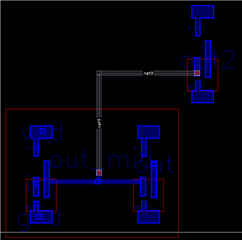
To show you my problem i created a hierarchical design consisting of two inverters in the first hierarchy, and a third inverter in the last hierarchy. The structure should be visible in the image below: the big red square is the lower hierarchy, meanwhile on the top right i have the third inverter belonging to the higher hierarchy.
I would like the minimum spanning tree to wire the input of the third inverter to any positions of the blue line that connect the 2 inverters of the first hierarchy.
Since I am using the minimum spanning tree, I would expect the gray line to be the shortest, but instead the auto-routing is routing it to the pin i placed around the middle point of the horizontal blue line(that little blue square): in fact if I move the pin around the gray line follows it. I've tried using the layer generation tool to automatically cover the blue line with the blue metal pin, but the problem still occurs: the auto-route wire the net to that specific pin. I think that is because the auto-route consider that little blue square (the pin generated from the schematic) the terminal of the net.
How can i tell the auto-route that it can connect to any points of the blue line, and not just where i placed the pin generated from the schematic?
Right now the only solution i have to this problem is to flatten the layout, but i would prefer to avoid this solution and keep a hierarchical design.
Thanks
Best regards, Andrea